
Quick URL Host Switcher for Developers
Overview
The Quick URL Host Switcher is a specialized desktop utility designed to streamline the debugging process for software developers. It enables users to rapidly toggle between different host domains within URLs—specifically between production (online) and local development (offline) environments. This functionality is particularly useful when replicating bugs that occur in live systems but require local testing for resolution.
For example, when a URL such as online.com/x/y/z needs to be tested against a local server at offline.com/x/y/z, the tool allows instant substitution without manual editing. This reduces the risk of human error and accelerates workflow efficiency during development cycles. The software targets professional developers, QA testers, and backend engineers who frequently switch between environments.
While the developer’s background is not publicly detailed, the tool’s focused functionality suggests a practical, code-driven origin. It is intended for use within browser-based development workflows, supporting real-world scenarios such as API testing, frontend debugging, and environment-specific issue reproduction. The tool operates directly within the browser context, making it accessible and efficient for day-to-day use.
Key Features & Capabilities
- One-click host switching – Instantly replace the domain in any URL with a configured alternative, reducing manual effort and error.
- Preserves path and query parameters – The full URL structure, including paths, fragments, and query strings, remains intact after switching.
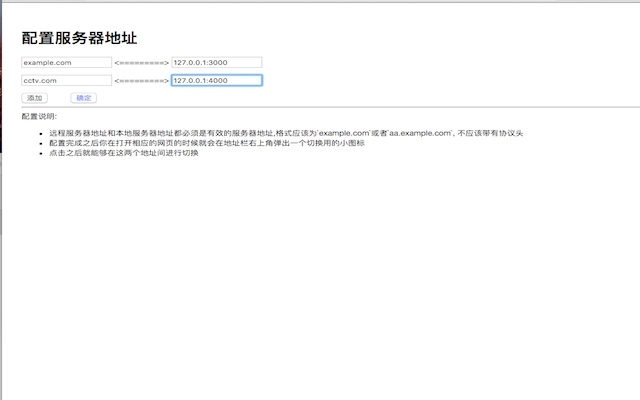
- Configurable host mappings – Users can define custom pairs of online and offline hosts for multiple projects or environments.
- Browser-integrated workflow – Designed to work seamlessly within modern web browsers, minimizing disruption to existing development practices.
- Lightweight and fast – With a footprint of just 1.5 MB, the tool consumes minimal system resources, ensuring responsiveness during active use.
These capabilities are especially valuable during debugging sessions where developers need to simulate production conditions locally. For instance, when a frontend application fails on a live server, the tool allows immediate testing of the same request against a local backend. This supports rapid iteration and reduces time-to-resolution for environment-specific bugs. The utility is also beneficial for teams using continuous integration pipelines that require consistent environment testing.
User Interface, Workflow & Performance
The user interface is minimal and focused on functionality, adhering to a clean, no-frills design typical of developer tools. It integrates directly into the browser’s extension ecosystem, accessible via a toolbar icon or keyboard shortcut. Navigation is intuitive: users activate the tool, select a host mapping, and apply the change with a single action.
Workflow efficiency is enhanced by the tool’s automation of repetitive URL manipulation tasks. Instead of copying, editing, and pasting URLs manually, developers can perform the same operation in seconds. The tool does not require complex setup or configuration, making it suitable for both novice and experienced users.
Performance observations are based on general software behavior patterns. The developer did not specify resource usage details. However, the small file size and browser-based execution suggest low CPU and RAM impact during operation. Stability is expected to be high, given the tool’s narrow scope and lack of dependency on external services. No known crashes or freezes were reported in the provided information.
Compatibility & System Requirements
The software is compatible with Windows, Mac, and Linux operating systems, ensuring broad accessibility across development environments. It functions as a browser extension, meaning it relies on the host browser’s capabilities rather than native system components.
The installation size is 1.5 MB, indicating a lightweight deployment. No specific hardware requirements were listed, though standard desktop systems should support the tool without issue. The developer did not provide additional system requirements.
Compatibility information was partially provided. While the supported platforms are confirmed, exact browser versions or API dependencies were not specified. Users are advised to ensure their browser is up to date to maintain optimal functionality.
Pros and Cons
Pros
- Effortlessly switches between online and offline server URLs
- Preserves URL structure including paths and query parameters
- Configurable for multiple environments and projects
- Lightweight with minimal system resource usage
- Free to download and use with no licensing restrictions
Cons
- Only supports browser-based workflows; not available as a standalone desktop app
- No built-in logging or history for past URL changes
- Exact performance metrics were not specified
- Limited to URL host manipulation—no additional debugging features
FAQ Section
Is the tool compatible with all web browsers?
The software is designed for use with modern web browsers, but specific browser compatibility details were not provided. It is recommended to check the extension store or developer documentation for supported browsers.
Is the tool secure to use?
The tool operates locally within the browser environment and does not transmit URLs or data to external servers. It is considered secure for use in development workflows, especially when handling sensitive or internal URLs.
How often are updates released?
Update frequency is not specified in the provided information. Users should monitor the official source for the latest version and security patches.
Can I use this tool offline?
Yes, the tool functions entirely offline once installed. It does not require an internet connection to perform URL host switching.
What license type does it use?
The software is free to use and distribute. No formal license details were provided, but the absence of pricing suggests a permissive, open-use model.
Final Thoughts + CTA
The Quick URL Host Switcher delivers a precise, no-nonsense solution for developers navigating between online and offline environments. Its simplicity, efficiency, and focus on a single high-impact task make it a valuable addition to any developer’s toolkit. While it lacks advanced features like logging or cross-browser sync, its core functionality is executed flawlessly.
It is especially beneficial for frontend developers, QA engineers, and backend teams working on environment-sensitive issues. The tool eliminates a common friction point in debugging workflows, saving time and reducing errors. With a free license and minimal footprint, it offers strong value with no barriers to entry.
Download Quick URL Host Switcher for Developers now.







